Frame it. Splat it. Fly through it.
Turn video and photos into a Gaussian splat. Drone, phone, 360 and camera footage, plus LiDAR, aligned into one scene. Train it, edit it, animate the camera and export.
Start from video or photos
Use video, photos or both, from whatever you shot with. Each source keeps its own settings: 360 video is aligned as one camera rig rather than as separate pictures, and LiDAR gives the result real-world scale. Everything comes out as one scene.
From capture to finished splat
The app is laid out the way the work goes, and every step writes a report you can open.
Add video, photos, 360 footage and LiDAR. Splatframes picks the sharp frames, keeps coverage, matches exposure and white balance, and aligns every source into one COLMAP model.
Camera moves, keyframed
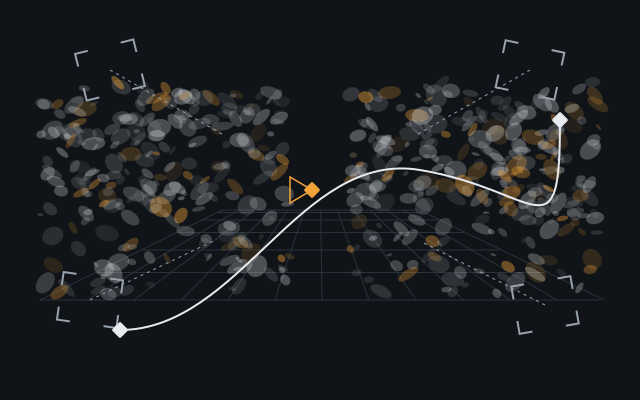
Set keyframes for the camera on a timeline (position, look-at, field of view and roll) and Splatframes eases between them along a smooth path. What you see playing here is what renders.
- Hold, linear or eased keys
- Stock orbits and dollies to start from
- Splats as layers, each with its own transform and opacity
- One move, rendered at 16:9, 9:16 or 1:1
- ProRes 4444 with alpha, H.264 or a PNG sequence
Select, grade, move
Rectangle, lasso, polygon and brush selection. Hide, lock, delete. Grade tint, temperature, saturation and opacity. Move with a gizmo.
Edits are saved as rules, so they re-apply to a retrained splat of the same area.
Every job writes a report
What it did, with which settings, and why anything failed.
- align_report.html: registered and failed images per source with reasons, reprojection error, LiDAR anchor residuals.
- manifest.json: exact settings, every frame's scores, intrinsics, every FFmpeg command.
- train_run.json: the plan, every attempt, held-out PSNR and SSIM.
The Splatframes trainer
The Trainer edition trains the splat on your own NVIDIA GPU and scores it as it goes.
What the progress card tells you
- Held-out PSNR
- How closely the splat matches photos it has not seen, in dB. Higher is better.
- Gaussians
- How many it has used so far, against the most your GPU's memory allows.
Benchmarks
The nine Mip-NeRF 360 scenes at the benchmark's standard image sizes, trained once each by the trainer and by LichtFeld Studio 0.5.2 in September 2026: 30,000 steps, at most 3 million Gaussians, scored on the same held-out views with the same script. LichtFeld Studio was run without its per-photo color model and edge map, the setting that gave it the higher PSNR on every scene here.
LichtFeld Studio has the lower LPIPS on bicycle, flowers, stump and treehill, the outdoor scenes with the most fine foliage. Other scenes, other settings and later versions of either tool will give other numbers.
Show as a table
| Scene | Splatframes PSNR | LichtFeld PSNR | Splatframes SSIM | LichtFeld SSIM | Splatframes LPIPS | LichtFeld LPIPS |
|---|---|---|---|---|---|---|
| bicycle | 25.38 dB | 25.21 dB | 0.777 | 0.772 | 0.178 | 0.165 |
| flowers | 21.67 dB | 20.75 dB | 0.625 | 0.605 | 0.294 | 0.237 |
| garden | 27.56 dB | 27.33 dB | 0.868 | 0.856 | 0.090 | 0.098 |
| stump | 26.68 dB | 26.56 dB | 0.783 | 0.776 | 0.153 | 0.140 |
| treehill | 22.79 dB | 22.35 dB | 0.646 | 0.622 | 0.322 | 0.265 |
| room | 32.46 dB | 31.90 dB | 0.933 | 0.919 | 0.138 | 0.153 |
| counter | 29.65 dB | 29.17 dB | 0.922 | 0.905 | 0.128 | 0.133 |
| kitchen | 32.27 dB | 31.47 dB | 0.936 | 0.930 | 0.085 | 0.095 |
| bonsai | 33.28 dB | 32.37 dB | 0.952 | 0.945 | 0.110 | 0.115 |
Two editions, one app
The Trainer edition adds the trainer. Same installer; your app key decides which edition it becomes.
- Video, photos, 360 video and LiDAR
- Frame selection, image prep, alignment, crop
- The splat editor: selection, grading, gizmo, crop
- Animate: camera keyframes, splat layers, stock moves
- Render ProRes 4444 with alpha, H.264 or PNG sequences
- Export .ply, .sog and .rad, and COLMAP datasets; reports for every job
- Everything in the Standard edition
- Training on your NVIDIA GPU
- Held-out PSNR and SSIM for every run, in train_run.json
- Retries with tiles and a lower cap when the GPU runs out of memory
- Delivered as a signed trainer pack the app downloads on first use
Both editions are in early access; pricing to be announced.
What you need
- Operating system
- Windows 10 or 11, 64-bit.
- Graphics
- A graphics card with OpenGL 4.3, for the viewer and the editor.
- Alignment
- Runs faster on an NVIDIA GPU. Without one, it runs on the CPU.
- Trainer edition
- An NVIDIA GPU: GeForce GTX 16 series, RTX 20 series or newer. More video memory trains larger splats; a 16 GB card holds up to 7.5 million Gaussians.
- Access
- An access code to download, and an app key for updates and the Trainer edition, both sent by email.
Get the app
Redeem your access code to download the installer. Installed copies update themselves, and presets and datasets stay in your user folder between versions.